Showing posts with label MISC. Show all posts

Laptop LCD showing strange colors FIXED

It often happens when you throw your laptop around like a nokia 1100 that your laptop stars showing strange colors on the lcd like this...


The proper method of fixing it is to repair or replace the lcd which ofcourse costs alot of the piggy bank.......

But to make a temporary fix to your lcd which costs only the movement of your sholuders will fix it.

Like the idea?/ I thought so

Put one hand on the lcd screen and the other on the back of the screen and PRESS it.


It fixes the issue........and believe me it happened to me.............i tried it and its been a long time since i saw those strange and somewhat irritating colours on my screen............

If it doesnot fix the issue...........take it to a repair centre.

HTML5

What Is HTML5?

HTML5 is the newest hyper text markup language for websites from the World Wide Web Consortium (W3C). The first draft was made public in 2008, but not much happened until 2011. In 2011, HTML5 was released and people started writing about it and using it, but the support in different browsers was still poor. Today all major browsers (Chrome, Safari, Firefox, Opera, IE) offer HTML5 support, therefore the newest HTML technology can be used at its best today.
html5 logo
The official logo of HTML5
HTML5 works with CSS3 and is still in development. W3C plans to release a stable version next year, but it still looks like this is a long shot. Since its release, HTML5 has been in continuous development, with the W3C adding more and more impressive features, therefore it seems quite unlikely that HTML5′s development will end soon, which is not necessarily a bad thing.
HTML5 is the successor of HTML 4.01, released for the first time in 1999. The internet has changed significantly since 1999 and it seemed like the creation of HTML5 was necessary. The new markup language was developed based on pre-set standards:
  • New features should be based on HTML, CSS, DOM, and JavaScript.
  • The need for external plugins (like Flash) needs to be reduced.
  • Error handling should be easier than in previous versions.
  • Scripting has to be replaced by more markup.
  • HTML5 should be device-independent.
  • The development process should be visible to the public.

What’s new?

HTML5 was created to make the coding process easier and more logical. You will see a bit later that many syntaxes are now deprecated and soon to be kicked out through the back door. The unique and impressive features HTML5 comes with are in the multimedia department. Many of the features it comes with have been created with the consideration that users should be able to run heavy content on low-powered devices. The syntactic features include the new <video>, <audio> and <canvas> elements, but also integration of vector graphics content (what we knew before as being the <object> tags). This means that multimedia and graphic content on the web will be handled and executed easier and faster, without the need of plugins or APIs.
  • <article> – this tag defines an article, a user comment or a post, so an independent item of content
  • <aside> – the aside tag marks content aside from the page content, which for example could be a lateral sidebar
  • <header><footer> – you won’t need to manually name IDs for headers and footers, as now you have a pre-defined tag for them
  • <nav> – the navigation can now be placed in the markup in between the nav tags, which will automatically make your lists act like navigation
  • <section> – this is another important new syntax, as it can define any kind of sections in your document. It works pretty much like adiv which separates different sections.
  • <audio><video> – these two obviously mark sound or video content, which will now be easier to run by devices.
  • <embed> – this new tag defines a container for interactive content (plugin) or external application
  • <canvas> – the canvas tag is quite exciting, as it allows drawing graphics via scripting (mostly JavaScript, but some others can be employed as well)
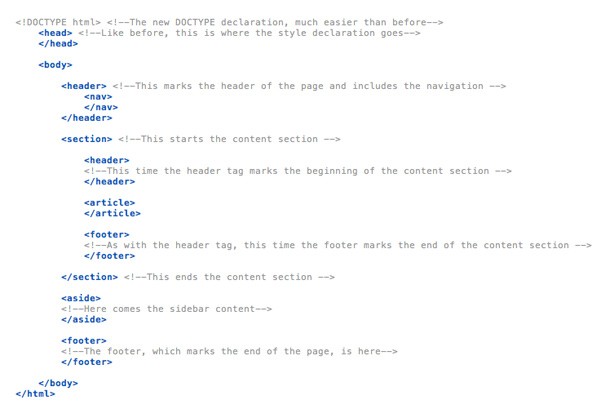
What is important to remember is that the new HTML5 tags do not always work as the ones before. For example, the header and footer tags will not only mark the start and the end of a page, but also the start and the end of each section you have. This means that these two tags are likely to be used more than once in the whole page. In the illustration below can you see what I mean.
html5 code example
Example of how HTML5 code looks like
Oh yes, and the DOCTYPE declaration finally makes some sense. Or, at least, this time it is much simpler than before and it is very easy for us to remember and we won’t have to search for it on the web or copy it from site to site. <!DOCTYPE html> closed by </html> at the end of the page is something we waited for for a long time to come and now it finally is here.
Moreover, complex XHTML declarations many of us used before can now be replaced with <html lang=”en”> and long encoding declarations can simply be written in this way: <meta charset=”utf-8″>. Can it get simpler than that? It most definitely can’t.
The following tags from HTML 4.01 are now removed from HTML5, therefore browsers do not offer support for them anymore. This means that it is a good idea to go back to your HTML pages and check for them, as they might disrupt the design in the latest browsers.
  • <acronym>
  • <applet>
  • <basefont>
  • <big>
  • <center>
  • <dir>
  • <font>
  • <frame>
  • <frameset>
  • <noframes>
  • <strike>
  • <tt>

Things to know about HTML5

It is crucial to remember that HTML5 is built on the success of its previous version, HTML 4.01, which is undoubtedly the best version ever. In order to be better at using HTML5 you do not need to forget everything about the previous version. You are not learning a totally new language here. Keep your beloved syntaxes and keep the way you used to format your code, only remember that now you need to build upon the coding skills you already have.
In case you have absolutely no knowledge of HTML and you want to start now, I advise you to start with HTML 4.01 and only when you master it move onto HTML5. Starting with the latest version is like learning to run before learning to walk – which is impossible as far as I know. HTML 4.01 still contains the basics of HTML5, therefore in my opinion you should have strong knowledge of former HTML versions in order to be able to master HTML5.
The upside of learning HTML5 now is that the new markup language works right away. You can basically do whatever you want with it today – and it is supported in all major browsers. From video to geolocation, local storage and microdata annotations, HTML5 is something we need to start using. If you are in the design business, sticking with HTML 4.01 is a mistake, because everybody will move on while you will remain behind.
HTML5 is definitely here to stay. It is created to sustain today’s necessities and especially because it is in continuous development, it will be able to sustain the changes that will happen in the industry for quite some time. One of the reasons behind HTML5 taking so much time to develop is because the W3C had to analyze lots of factors and think of the future. They took their time and finally delivered something that can easily be labelled as a high-quality product.

Examples

In order to show you how far HTML5 actually got, I will showcase some websites and applications made with the new markup language, so you can see how much you can actually do with it.
1. Read is a HTML5 responsive theme made for WordPress. It is minimalistic, very simple to understand and use, loads faster than ever and it is not expensive at all.
2. SmartStart is another incredibly simple to use HTML5 template.
html5 theme

3. BIZfolio is also made with HTML5, but it is not a simple template or a WordPress theme. BIZfolio is developed so that it works with Drupal.
drupal html5 theme

4. We start looking at applications by showcasing this simple Poker Blind Timer made with HTML5
blind timer

5. Coolendar is a great calendar application developed with HTML5, which can be both found for computer and portable devices (Android and iOS).
coolendar

6. Scribd is built with HTML5 and allows users to have easy and quick access to different files and documents other users upload.
scribd

Besides websites and applications, developers created games based only on HTML5, instead of Flash as it was before. Here are some addictive HTML5 games out there. Check it out, some of the games are really entertaining.


20-addictive-html5-games-for-you-to-enjoy

What is R4BIA?

What Is The Meaning Of Rabia/Raaba/R4bia- Four Fingered Hand Sign/Symbol?


Have you seen the yellow and black colored four fingered hand sign on social media recently and want to know that what is it? Why people are posting about it on internet? Raaba/Rabia or R4BIA is four in arabic, and this hand sign by raising 4 fingers has become the symbol of the massacre in Egypt as well as Rabaa al-Adawiya Square where the anti-coup protests take place.

#‎Rabia means four in Arabic and it's the symbol of the incident of Egypt Massacre. More than 181 people were killed last Friday in mass rallies staged by Morsi supporters in several Egyptian cities to protest Wednesday's violent dispersal of their two main protest sites Cairo's Rabaa al-Adawiya and Giza's Nahda squares on Wednesday.
The Health Ministry said that at least 638 people had been killed in nationwide violence since Wednesday, including 288 in Rabaa and 87 in Nahda.
Erdogan (Primeminister of Turkey) showed solidarity with Muslim brotherhood by showing 4 fingers. Muslims from all over the word embraced this symbol for the protest of killings of Muslims in the world.

Rabaa” meaning four or the fourth in Arabic has become the sign of anti-coup protests in ‪#‎Egypt‬ worldwide. It is the symbol of war against military regime & support for those who were martyred while protesting against military coup. The massacre on August 14 near Masjid ‪#‎Rabia‬ of anti-coup protesters in Egypt tried to voice their demands to the world by raising their four fingers. Rabaa al-Adawiya Square is around 180 feet wide road and almost 6 miles long & it was fully decorated by the gathering of anti-coup protesters, it is as famous as ‪#‎Tahrir‬Square in Cairo due to resistance of hundreds of thousands of anti-coup protesters going on for more than two months. It has witnessed one of the gravest massacres of recent years. Let’s all change our DP to ‪#‎R4BIA‬ to show solidarity with our ‪#‎Egyptian‬brethren.


You can show your support and solidarity with Egypt's Muslims by replacing your current display picture with RABIA SIGN picture.

7 Afforable Video Editing Softwares

Now that we’re able to make decent quality videos right from our phones video editing software is becoming more essential to the average consumer. For many, the most basic editing software just isn’t versatile enough, and the premium editing software, like Adobe Premiere Pro and Final cut, are far too expensive and contain an overwhelming amount of features and capabilities.
There is a growing market for affordable, mid-range video editing software, with expanded features that don’t confuse and frustrate the amateur videographer. Below we’ve compiled some of the best affordable video editing software with more features than your average stock Movie Maker.


VideoStudio Pro X3 – $49 (PKR 4900)

Corel VideoStudio Pro X5 is an all-in-one video editor that brings together creative editing, advanced effects, screen recording, interactive web video and total disc authoring. Ultra-fast and packed with intuitive tools, it lets you create everything from family movies and slideshows, to fun stop motion animations, and screen recordings of presentations, tutorials and more. Get creative with advanced compositing and stellar creative effects. Tap into the full power of your multi-core processor with unprecedented speed. And share everywhere with native HTML5 video support, and enhanced DVD and Blu-ray authoring.

Creator 2012 – $61 (PKR 6100)

Creator 2012 Pro from Roxio is your Swiss Army knife for various media tasks, such as video editing, photo enhancement, music mix creation, file conversion, data backup, and DVD burning. This Pro version of the software includes advanced features that were previously available only from professional-level applications – you get HDR (high-dynamic-range) photo creation, SmartSound soundtrack creation, and much more.

Premiere Elements 11 – $91  (PKR 9100)

Adobe Premiere Elements 11 software helps you edit video using smart, automated options, enhance your movies with pro-quality effects, and then share on virtually any screen. Premiere Elements has for a long time been among the most-used consumer-level editing programs available, and version 11 is in all regards the best Elements yet.
Elements 11 features a very broad and powerful media organizer, all types of movie-style effects and transitions, strong correction tools for both video and audio, and, among much more, several “quick-edit,” “on-the-go” tools, like InstantMovie, which automatically creates a cut with music and titles and transitions.
Highlights:
  • Multi-Platform Video Editing Software
  • Powerful, Easy to Edit, Easy to Navigate
  • User-Friendly, Customizable Interface
  • Imports Video and Photos
  • Drag-&-Drop Clips, Transitions, Effects
  • InstantMovie Auto-Edits Your Best Clips
  • Mobile Connectivity / Instant Sharing
  • Easy Color and Sound Adjustments
  • Hollywood FilmLooks / Stores of Effects
  • Supports Most All File Formats

Stoik Imagic – $41 (PKR 4100)

STOIK Imagic is a combination of photo album, organizer, photo viewer, image and video editor with exhaustive set of tools for all your media needs and tasks. From convenient organizing and cataloging through fast media indexing, browsing by folders, calendar, tags, to powerful search by file and EXIF attributes to automatic batch enhancement, panorama and HDR stitching, RAW conversion, generation of games and paint-by-numbers, video authoring.

Muvee Pixie – $35  (PKR 3500)

Muvee Reveal X comes complete with professional effects, transitions, great looking Titles, Credits, Captions, and Music to set the mood. Reveal X allows you to import photos and videos from multiple cameras. Even if each source comes in different formats, sizes, aspect ratios (that is 16:9 wide screen, or the traditional 4:3 like a 4X10 photo), it doesn’t matter. Muvee Reveal X makes it easy to bring it all together to make fantastic movies! First, just select your photos and video, then select a Style (6 styles included). Just Preview and hit Save. You can then save your movie and share it any way you’d like. You can even personalize your videos by adding Opening Titles, Closing Credits, Captions (or some call it subtitles) to the videos or photos, and even Voice Over to add your own commentary.
Muvee Reveal X allows you to burn a DVD to watch your movie on the big screen, or upload to Facebook and YouTube to share with family and friends. You can even export your movie in all the popular formats: MPEG1, MPEG2, MPEG4, H264 (720P and 1080P), WMV, MOV, AVI.

Pinnacle Studio 16 – $62 (PKR 6200)

Pinnacle Studio Plus 16 lets you take control of the latest HD video editing technologies, including Blu-ray and AVCHD. All new Pinnacle Montage theme based editing – designed by professional producers and artists – puts incredible creative power at your fingertips. Simply drag and drop your video clips and still images to preview your movie – and watch your content come alive complete with Hollywood style multi-layered effects, animated graphics, titles and Hi-Fi audio. Edit and polish to your heart’s content with the sleek new video editing interface. When you are finished, archive your video memories, publish them on YouTube, or enjoy them on DVDs and portable devices.

iMovie – $78  (PKR 7800)

Chances are, you have a camcorder, a digital camera, or an iPhone — and maybe all three. That means one thing: You have a ton of great video. iMovie puts it all in one place and organizes it for you so your video is easy to browse and fun to watch. Just plug in your device, open iMovie, and start importing your video. It appears in your Event Library — the one place you’ll find everything you’ve ever recorded. Just like photos in iPhoto, videos are organized by Events. And as your collection grows, you can rate clips as “favorite” or “rejected,” tag them with preset or custom keywords, and filter them so you can find the best scenes (or hide the ones you’re not thrilled with).

Animoto (Web-App) – Free & Premium Plans 

Animoto auto-generates cool slideshow videos using your own uploaded photos and music. Just select which pics you want to use (from your hard drive or sites like Flickr and Facebook), arrange them in the order you want, choose a music track or upload your own, and then sit back for a few minutes and let Animoto work its magic. You end up with a polished finished product complete with transitions and effects. Thirty-second clips are free, longer clips cost $3.